Editor AI for Windows Photos
Local-first, cloud-assisted AI editing for tens of millions of Windows users.
At Microsoft I worked on bringing modern AI editing into the Windows Photos app. We built and shipped a new generation of tools—background removal, object selection, magic erase, and upscaling—that run on-device when possible and fall back to cloud models when needed. These features helped drive a ~20% increase in monthly active users over the first six months after launch.
Business outcomes
Monthly active users increased by roughly 20% in the six months after the Editor AI launch.
AI editing shipped inside the default Windows photo experience rather than as a niche add-on.
A reusable pattern for on-device inference with cloud fallback, telemetry, and rollout gates.
Product context
Windows Photos is the default photo viewer and editor on Windows, used by tens of millions of people. When I joined the team, the editor had only a simple “auto enhance” feature built with traditional image processing and classical ML. Modern deep-learning and generative AI capabilities did not exist in the product.
I was part of a ~30-engineer Photos organization, in a focused AI photo editing group of 6 engineers. We collaborated closely with:
Data scientists to pick the right models and tune them for quality and performance.
A separate backend team that hosted cloud models behind managed Azure AI endpoints.
The product goals were to make Windows Photos a flagship showcase for Windows AI and reduce churn to third-party editors by making the default app powerful enough for most everyday editing tasks.
My role
My role was to integrate local AI models into the Windows Photos Editor and co-own the re-architecture of the editor pipeline so it could support masks, layers, and AI-driven edits.
Integrated on-device ONNX Runtime models (GPU-first, with session reuse) into the editor.
Co-designed how the editor represents masks, selections, and layered edits so AI tools can plug in cleanly.
Heavily shaped the Magic Erase and Background features end-to-end—from UX integration through to performance and quality optimization.
Integrated with cloud-hosted models (Azure AI endpoints) as a fallback when local inference was not suitable.
Improved telemetry and quality checks so we could ship new AI features safely at Windows scale.
What we built
We introduced a set of Editor AI tools that make complex edits accessible to everyday users:
Magic erase: remove unwanted objects and inpaint the background.
Background tools: blur, remove, or replace the background using subject segmentation.
Object selection: select people or objects with one click, then refine with brushes.
Upscaling / enhancement: improve detail and perceived quality in low-resolution photos.
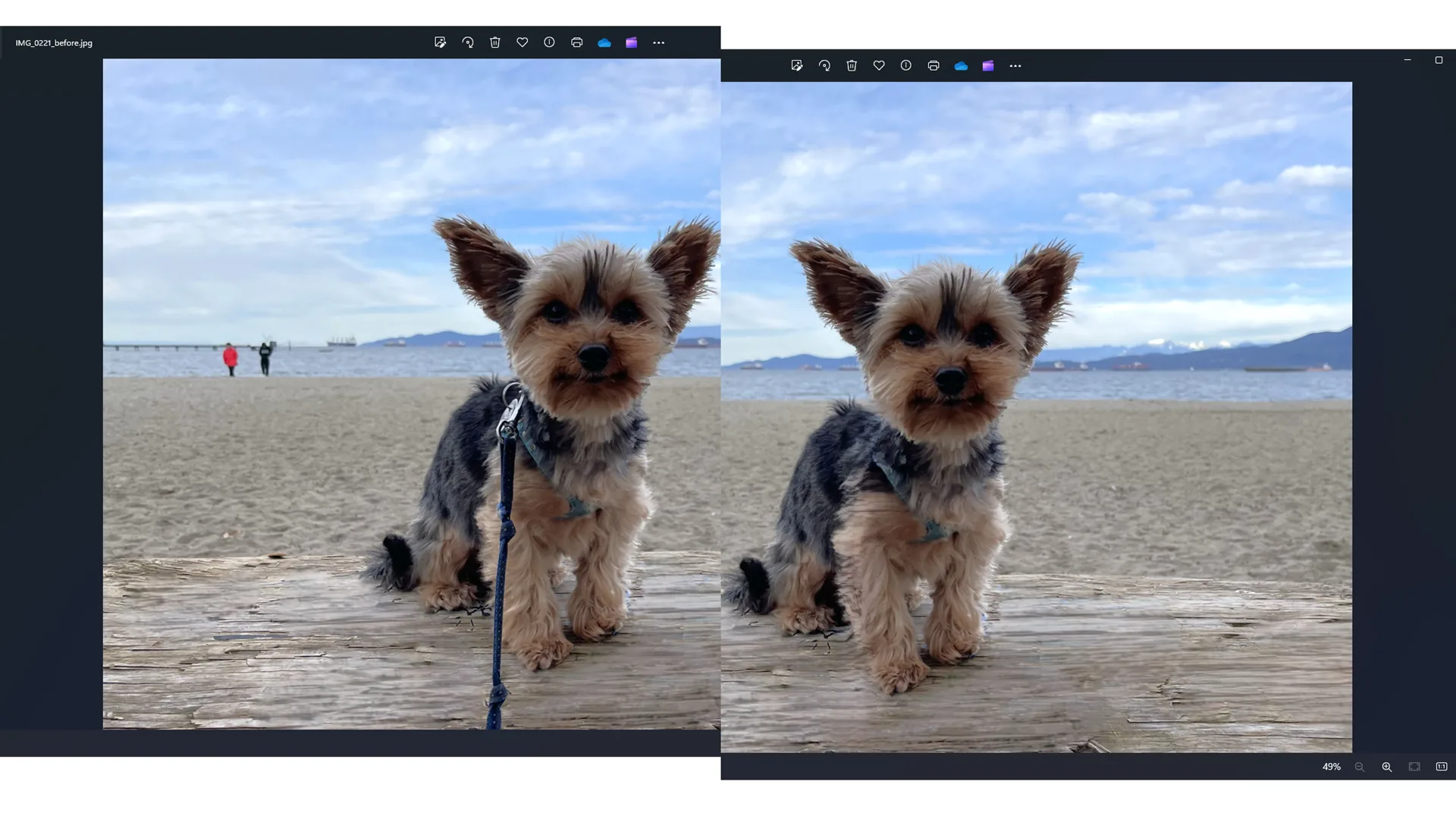
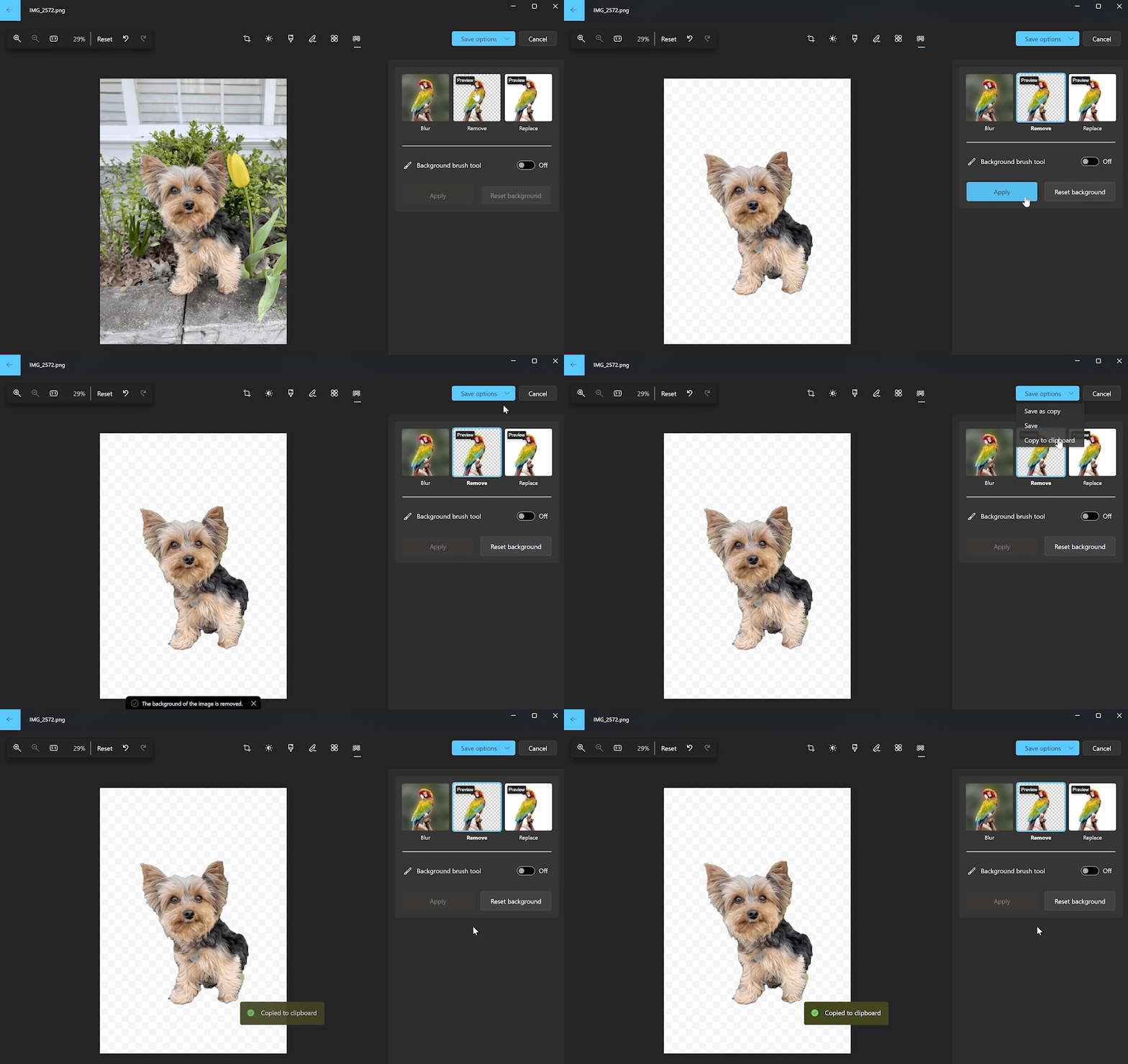
From a user’s perspective, these workflows are simple: brush roughly, let the model refine the mask, tweak if needed, then apply. Under the hood, they depend on a new architecture for AI-powered masks, selections, and compositing.
Architecture & technical design
Editor AI follows a local-first, cloud-assisted design that balances latency, quality, and device diversity:
Editor front-end (C#/TypeScript): implements the editing UI (brushes, panels, sliders) and manages selection masks and layered edits in the user’s session.
Local AI inference (ONNX Runtime, GPU-first): runs segmentation, selection, and inpainting models directly on the user’s device, reusing sessions to avoid reload overhead and processing large images via tiling/batching to stay within memory limits.
Cloud inference (Azure AI endpoints): integrates with managed endpoints owned by a backend team, used when device capabilities or image properties make local inference unsuitable.
Decision layer: encapsulates logic for choosing local vs. cloud paths based on device capability, feature type, image size, and service health, so most users get instant local results while others still see consistent quality.
Telemetry & quality gates: instrumentation for events like
feature_invoked,edit_completed,undo, andedits_savedfeeds Application Insights dashboards and release gates in Azure DevOps.
Key engineering challenges
Making heavy AI edits feel fast
Large images and GPU-heavy models can easily stall an editor. To keep Editor AI responsive, I:
- Reworked image processing with tiling and batching so we only keep manageable regions in memory.
Tuned the data flow between the editor and ONNX Runtime, emphasizing GPU inference and session reuse.
- Optimized memory usage to avoid spikes that would impact other parts of the app.
These improvements reduced P95 time-to-result for heavy edits so that operations like Magic Erase feel interactive even on consumer hardware.
Balancing local and cloud across diverse devices
Windows Photos runs on everything from budget laptops to high-end workstations. A single strategy would either be too slow on low-end devices or underuse powerful hardware.
The decision layer defaults to local GPU inference when the device can handle it.
For weaker devices or particularly demanding cases, it transparently routes to cloud-hosted models.
Health signals ensure the editor fails gracefully and stays responsive if cloud services are degraded.
Shipping AI features reliably at Windows scale
Early on, test flakiness and weak metrics made AI feature releases risky. I contributed to stabilizing this by:
- Reducing flaky tests and tightening assumptions in integration and functional tests.
Ensuring key user journeys were covered by tests that could run reliably in CI (Azure DevOps pipelines).
Helping define quality gates based on live telemetry so staged rollouts could be blocked if success rates or latency regressed.
Impact
Editor AI contributed to roughly a 20% increase in monthly active users over the six months following launch.
Many everyday edits that previously required third-party tools could now be completed inside Windows Photos, reducing churn out of the default app.
The app became a stronger showcase for Windows AI, aligning with the broader Windows product strategy.
The team now has a reusable pattern for local + cloud AI integration and a more robust telemetry and testing pipeline for future AI features.
Tech stack & lessons
Tech: TypeScript, C#, Python, ONNX Runtime (GPU-first, session reuse), Azure AI endpoints, Docker, Windows platform APIs, Azure DevOps, Application Insights.
Key lessons I bring to future AI-integration work:
AI as a feature, not just a model: the UX, latency, reliability, and analytics around the model matter as much as the model itself.
Local-first with a cloud escape hatch: run models on-device where possible, with a simple, observable routing layer that can fall back to the cloud when necessary.
Telemetry-driven decisions: instrument usage, completion, and latency from day one and use those signals both to prioritize performance work and to guard deployments.
Need help with a similar system?
Share the product goal, technical risk, and timeline. We will map the right next step from there.